
Configurable Delay in Scheduled Pipelines
This guide explains how to use the configurable delay feature for scheduled pipelines. This feature allows you to delay the execution of a scheduled pipeline by a set number of minutes after its scheduled start time. This is useful to ensure data completeness and accommodate late-arriving events before the pipeline runs.
How to configure delay
When editing the Associate Query page:
-
In the Set Variables section, add Delay. Delay defines how many minutes the system waits after the scheduled trigger time. The pipeline runs only after this waiting period completes.
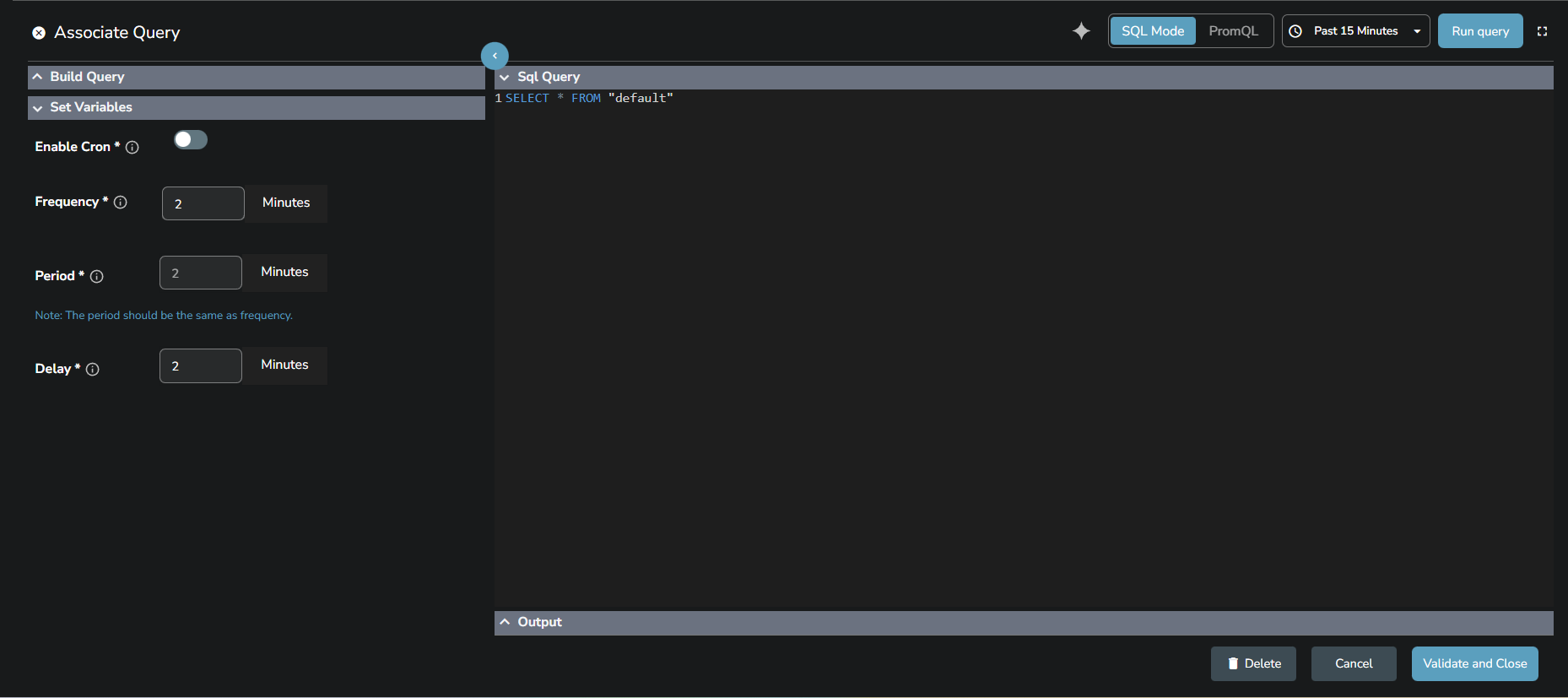
-
Select Validate and Close.
Note
Since Delay is a required field when setting up a scheduled pipeline, enter 0 minutes if you want the pipeline to run exactly at the scheduled time without any delay.
Example
If the pipeline is configured with the following settings:
- Frequency: 5 minutes
- Period: 5 minutes
- Delay: 2 minutes
Behavior: The pipeline is scheduled every 5 minutes and runs 2 minutes after each scheduled time, processing data from the previous 5-minute window.
At 10
Note
- Works with Cron: Delay also applies when using cron-based schedules.
- Data Window Unchanged: Delay only affects when execution starts. It does not change the data range.
Related links
Last updated on
Manage Pipelines
Manage, filter, search, edit, pause, or delete real-time and scheduled pipelines in OpenObserve using the intuitive pipeline list and actions panel.
Streams Overview
Streams in OpenObserve define how observability data is ingested, stored, indexed, and queried, covering stream details, schema settings, and retention.